IBM Mainframe to IBM 3151 Interface
Introduction
IBM's 3151 ASCII Display Station from 1987 is an interesting device. It is a serial terminal with a monochrome (green or amber) CRT monitor. It supports several screen sizes and connection speeds and offers a quite big set up menu with all kind of configuration options. By the use of expansion cards, which plug into the backside of the terminal it can also emulate many classic terminals from other producers like the DEC VT100 or VT220.What I found really surprising, is its support of the so-called block mode and for fields for output and input on the screen, which enable a host computer to define kind of a form on the screen, which the user can fill out. After pressing the "Send" key or a function key the input fields changed by the user are transferred in one go back to the host.
This looks very much like the way how 3270 terminals for the IBM mainframe computers work. Unfortunately, the commands, which the IBM 3151 understands in order to define the fields etc. are not the same as the ones of the IBM 3270 protocol, but they are very similar. Therefore, it is quite easy to translate the 3270 commands to semantically equivalent 3151 commands and vice versa. The IBM 3151 also speaks ASCII instead of the EBCDIC encoding used by the IBM mainframes. But this translation is also straightforward.
This little interface program performs these translations by connecting to a real or emulated IBM mainframe via telnet and to an IBM 3151 terminal via an RS232 serial port connection. Then, the data stream coming in from the mainframe is transformed into the corresponding 3151 commands, EBCDIC is tranlated to ASCII, and the result is then sent to the terminal. The same is done for the other direction.
Installation on the PC
You can find the interface program on github here: IBM Mainframe to IBM 3151 InterfaceAlternatively, you can download everything here: mainframe3151.zip
The github repository and the zip file contain the source code and an executable file (mainframe3151.exe) for Windows. You can just use the exe file or build the program from the sources with the "make.bat" batch file. You need gcc and MinGW for this.
Connecting the terminal to the PC
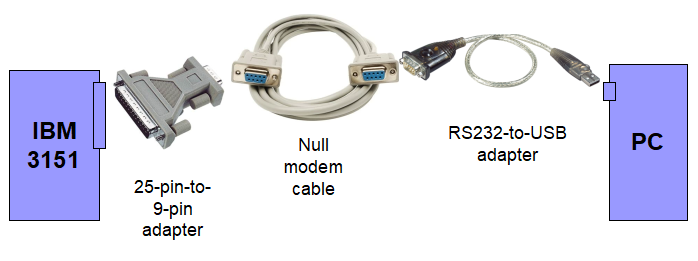
The IBM 3151 can be connected to your PC with a null modem cable. If your PC has only a USB port and your null modem cable has only 9 pins, you can use the according adapters. A typical configuration for the connection is for example this one:
Running a mainframe emulation
Start an IBM mainframe emulation on your PC, e.g. by using the Hercules mainframe emulator with an instance of the VM/370 or MVS operating system. Alternatively, get the IP address and port number of a running external mainframe emulation or of an external real IBM mainframe computer.Starting the interface program
The program has to be started with the following parameters:mainframe3151 <serial port> <server> <port> [ -i ]Where the parameters mean the following:
- <serial port>
- COM port name (e.g. COM1, COM2, ...) for connection to the 3151 terminal. Attention: The COM port must be set to 19,200 baud.
- <server>
- Server name of mainframe for telnet connection (e.g. localhost, big.iron.com, ...)
- <port>
- Telnet port number of the mainframe (e.g. 3270, 23, ...)
- -i
- Option that can be added at the end to display everything at high intensity. This is for very dim terminals (like mine). Text, that would originally be shown at high intensity, is displayed as reverse text, instead.
mainframe3151 COM3 localhost 3270This establishes the connection with an IBM 3151 terminal connected at serial port COM3 and with an emulated mainframe (e.g. with Hercules) running on your computer. The mainframe emulation in this case accepts its terminal connections at telnet port number 3270.
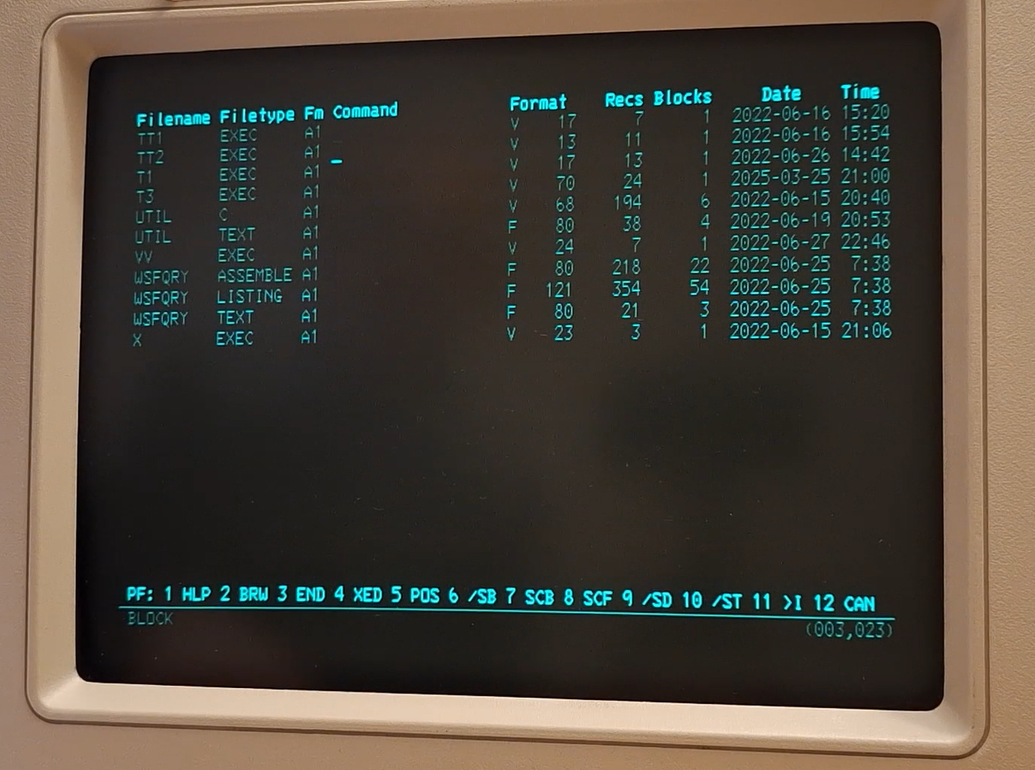
The 3151 connected to a mainframe then looks like this:
I also made a video about it:
Have fun working on a mainframe with a real IBM terminal!